

WhatsApp ordering system restaurant:; Learn how to set up an automated WhatsApp ordering system for your restaurant — no staff needed. AI understands orders, suggests add-ons, and sends them to your kitchen 24/7.
The Order Channel You’re Ignoring
Here’s a scenario every restaurant owner knows too well:
It’s 11 PM. Your restaurant is closed. Your phone buzzes — a regular customer wants to place an order for tomorrow. You’re tired. You’re not checking messages. By morning, you’ve lost the sale.
Or worse: it’s peak lunch hour, your dining room is full, your phone won’t stop ringing with takeaway orders, and your staff can’t keep up. Orders get written down wrong. Customers get frustrated. You’re losing money because you can’t handle the volume.
There’s a better way.
WhatsApp — the app with over 2 billion users worldwide — is the most powerful ordering channel most restaurants aren’t using properly. In markets like Nigeria, the Philippines, and across Africa and Southeast Asia, WhatsApp isn’t just a messaging app. It’s how customers discover businesses, ask questions, and place orders.
But here’s the secret: you don’t need staff to manage WhatsApp orders.
With a modern WhatsApp ordering system for restaurants, customers can message your business at any hour — and an AI assistant understands their order, confirms it, suggests add-ons, and sends it directly to your kitchen. No human intervention required.
In this guide, you’ll learn exactly how automatic WhatsApp ordering works, the different ways to set it up, and why Billmatik offers the easiest, most complete solution for restaurants that want to start taking orders 24/7 — without hiring extra staff.
What Is an Automated WhatsApp Ordering System?
An automated WhatsApp ordering system is technology that lets customers place food orders through WhatsApp without requiring a staff member to manually read, interpret, and enter each order.
Here’s how it works in practice:
- Customer sends a message — They text your restaurant’s WhatsApp number with something like: “I’d like two chicken burgers, one large fries, and a Coke”
- AI processes the request — The system uses artificial intelligence to understand natural language, even if the customer’s message is casual or incomplete.
- AI confirms and clarifies — If something is unclear, the AI asks follow-up questions. It can also suggest add-ons: “Would you like to add cheese for ₦500?”
- Order is created — The AI generates a structured order and sends it directly to your kitchen display system or POS.
- Customer pays — Payment is processed within the chat through integrated payment methods like cards, mobile wallets, or bank transfers.
- Confirmation sent — The customer receives an order confirmation and estimated pickup or delivery time.
All of this happens automatically, 24 hours a day, 7 days a week. No staff needed to answer messages, take orders, or enter them into your system.
Why WhatsApp?
- Your customers are already there — In Nigeria and the Philippines, over 90% of smartphone users are on WhatsApp. It’s their primary communication tool.
- No app download required — Customers don’t need to install another app or create another account.
- It’s conversational — Ordering feels natural. Customers can say “something spicy” or “what I ordered last time” and the AI understands.
- You bypass aggregator fees — Instead of paying 22-33% commission to delivery apps, you own the customer relationship directly.
Loyverse POS Review 2026: What It’s Missing (and What to Use Instead)
The Problem with Manual WhatsApp Ordering
Before automation, most restaurants handled WhatsApp orders manually:
- A staff member monitored the WhatsApp Business app
- They read each message and typed the order into the POS
- They calculated the total and sent a payment link or requested bank transfer
- They confirmed the order and told the kitchen
This process is slow, error-prone, and expensive.
The costs of manual ordering:
| Problem | Impact |
|---|---|
| Missed messages after hours | Lost revenue from late-night orders |
| Staff time spent on WhatsApp | 2-3 hours daily of paid labor |
| Typing errors | Wrong orders, refunds, unhappy customers |
| No upsells | Missed opportunities to increase order value |
| No order history | Can’t track customer preferences or repeat orders |
| No integration | Orders must be re-entered into your POS manually |
One restaurant owner told us: “I was paying someone ₦100,000 a month just to monitor WhatsApp and type orders into our system. And we still missed orders during busy hours.”
Automation eliminates all of these problems.
How to Set Up an Automated WhatsApp Ordering System (3 Approaches)
There are three main ways to implement a WhatsApp ordering system for your restaurant. Each has different costs, complexity levels, and capabilities.
Approach 1: The DIY Route (Build It Yourself)
This is the most technically complex option. It involves connecting multiple tools and services to create a custom automated ordering system.
What you need:
- WhatsApp Business API account — You need official Meta approval, which can take weeks
- AI service — OpenAI API (GPT-4), Google Gemini, or similar
- Workflow automation — n8n, Make, or Zapier to connect everything
- Database — Supabase or similar for conversation memory and menu storage
- Payment gateway — Stripe, Paystack, Flutterwave, etc.
- Technical skills — You or someone on your team needs to know how to configure APIs, write prompts, and debug issues
How it works: You build a workflow that receives WhatsApp messages, passes them to an AI model that understands the order, creates a structured order, and sends it to your kitchen.
Pros: Full customization, you control everything.
Cons: Complex, time-consuming, requires technical expertise, ongoing maintenance, multiple subscriptions.
Time to set up: 2-4 weeks minimum.
Cost: $100-500+ per month for APIs and services, plus developer time.
Example: The n8n workflow template for restaurant WhatsApp ordering requires a WhatsApp Business API account, OpenAI API key, Supabase account, Google Drive account, Google Maps API key, and Gemini API key. That’s six different services to configure before you even start testing.
Approach 2: No-Code Chatbot Builders
Platforms like Pabbly Chatflow and similar tools allow you to build WhatsApp chatbots without coding.
How it works: You use a visual interface to design conversation flows, upload your menu, set up triggers (like keywords), and connect to WhatsApp. When a customer sends a keyword like “hungry,” the chatbot activates and guides them through the ordering process.
Pros: No coding required, faster setup than DIY.
Cons: Limited AI capabilities (mostly keyword-based, not natural language understanding), rigid conversation flows, no deep integration with your POS or kitchen system, customers must use specific keywords or buttons.
Time to set up: 1-3 days.
Cost: $20-100+ per month depending on features and usage.
Limitation: These are “decision-tree” chatbots, not true AI. If a customer types “I want two of the same burger I got last Tuesday” instead of a predefined keyword, the bot won’t understand.
Approach 3: Restaurant-Specific AI Ordering Platform
This is the simplest and most powerful option. Platforms built specifically for restaurants handle everything — AI, WhatsApp integration, POS connection, kitchen routing, payments, and customer management — in one unified system.
How it works: You sign up, connect your WhatsApp number, upload your menu, and you’re live. The AI handles natural language orders automatically.
Pros: Everything works out of the box, true AI natural language understanding, deep integration with your restaurant operations, no technical skills required.
Cons: Monthly subscription cost (but far cheaper than hiring staff or building your own system).
Time to set up: Under 30 minutes.
Cost: Transparent monthly subscription, no hidden fees.
Example: Billmatik offers a complete restaurant operating system with AI WhatsApp ordering included. No separate services to configure, no APIs to manage, no technical expertise needed.
What Billmatik’s AI WhatsApp Ordering Does (That Others Don’t)
Billmatik is the complete restaurant operating system — and AI WhatsApp ordering is built right in. It’s not an add-on or a separate product. It’s part of a unified platform that manages every aspect of your restaurant.
Here’s what Billmatik’s AI WhatsApp ordering delivers:
1. Natural Language Understanding (Not Just Keywords)
Customers don’t need to use specific phrases or click buttons. They simply message naturally:
- “I want two chicken burgers and a large fries”
- “Can I get the same as last Friday?”
- “Something spicy but not too hot”
The AI understands intent and creates the order automatically.
2. Smart Order Intake
When a customer messages, the AI:
- Reads the message and identifies what they want
- Checks if items are in stock
- Confirms the order with the customer
- Creates the order in your POS instantly
3. AI-Powered Upselling
The AI doesn’t just take orders — it increases your revenue. Based on what the customer is ordering, it suggests relevant add-ons:
- “Would you like to add cheese for ₦500?”
- “Our large fries are only ₦200 more than regular — want to upgrade?”
This happens automatically with every order.
4. Shareable Menu Link
Customers can browse your full menu via a WhatsApp link — tap items, add to cart, and place orders without leaving the app.
5. 24/7 Operation
The AI never sleeps, never takes a break, and never misses a message. Orders come in at 2 AM? The AI handles them. Holiday? The AI is working.
6. Follow-Up on Incomplete Orders
If a customer starts an order but doesn’t complete it, the AI sends an automated follow-up message to help them finish.
7. Review Collection
After delivery, the AI asks for feedback and routes any complaints directly to you.
8. Integration with Your Full Restaurant Operations
This is what makes Billmatik different from standalone WhatsApp chatbots. Orders taken via WhatsApp flow directly into:
- Your POS — for billing and reporting
- Your Kitchen Display System — so the kitchen sees the order instantly
- Your Inventory — stock is auto-deducted
- Your Rider Management — for delivery assignment and tracking
- Your Customer Credit System — if customers have credit accounts
- Your Loyalty Program — points are automatically added
One platform. One dashboard. Everything connected.
Comparison: How to Take Orders on WhatsApp
| Method | Setup Time | Technical Skills | AI Understanding | Restaurant Integration | Monthly Cost |
|---|---|---|---|---|---|
| DIY (n8n + APIs) | 2-4 weeks | Advanced | ✅ Full AI | ⚠️ Manual | $100-500+ |
| Chatbot Builder | 1-3 days | Basic | ❌ Keyword-based | ❌ Limited | $20-100+ |
| Billmatik | Under 30 min | None | ✅ Full AI | ✅ Complete | Transparent |
Why Billmatik Is the Easiest WhatsApp Ordering System for Restaurants
No Technical Skills Required
With DIY solutions, you need to understand APIs, configure workflows, and debug issues. With Billmatik, you upload your menu and you’re live in under 30 minutes.
Everything in One Place
DIY solutions require separate accounts for WhatsApp API, AI, database, payment processing, and workflow automation. Billmatik includes everything in one platform.
Built for Restaurants, Not General Business
Generic chatbot builders aren’t designed for restaurant workflows. They don’t understand tables, courses, modifiers, or kitchen routing. Billmatik is built specifically for food businesses.
True AI, Not Decision Trees
Keyword-based chatbots break when customers don’t use the exact right words. Billmatik’s AI understands natural language — customers can talk like humans.
No Commission on Online Orders
Many ordering platforms take a percentage of every sale. Billmatik charges zero commission on online orders.
30-Day Money-Back Guarantee
Try it risk-free. If it doesn’t work for your restaurant, you get your money back.
Local Payment Support
Billmatik integrates with the payment methods your customers actually use — Paystack, Flutterwave, Interswitch, GCash, Maya, and more.
Real-World Example: How a Restaurant Uses Billmatik’s AI WhatsApp Ordering
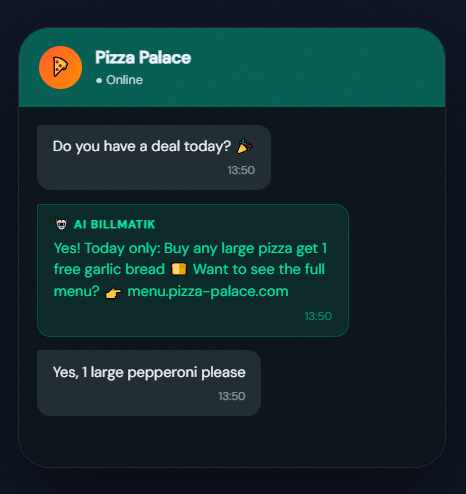
Imagine Pizza Palace — a busy restaurant in Lagos that does dine-in, takeaway, and delivery.
Before Billmatik:
- Two staff members monitor WhatsApp during peak hours
- They manually type orders into the POS
- Orders get missed when it’s busy
- Customers get frustrated with slow responses
- No orders after 10 PM when staff go home
After Billmatik:
- Customers message the restaurant’s WhatsApp number at any hour
- AI understands the order: “I want a large pepperoni pizza, extra cheese, and two Cokes”
- AI confirms: “Large pepperoni pizza with extra cheese and two Cokes — ₦12,500. Confirm?”
- Customer confirms, pays via the integrated payment link
- Order appears instantly on the kitchen display
- Stock is auto-deducted from inventory
- Customer receives confirmation and estimated delivery time
- AI suggests: “Want to add garlic bread for ₦2,000?”
- Customer adds it. Order value increases.
- Delivery rider is assigned. Customer gets live tracking.
All without any staff touching a phone.
The result: Pizza Palace now takes orders 24/7, increases average order value through AI upsells, and has freed up two staff members to focus on customers in the dining room.
Frequently Asked Questions About WhatsApp Ordering Systems
1. Do I need a WhatsApp Business API account?
With Billmatik, no — the platform handles the WhatsApp integration for you. With DIY solutions, yes, you need to set up and maintain your own API account.
2. Can the AI understand orders in different languages?
Yes. Modern AI ordering systems can understand multiple languages and even process voice messages and images.
3. What if a customer orders something that’s out of stock?
The AI can check your inventory in real-time and notify the customer if an item isn’t available, suggesting alternatives.
4. How do customers pay?
Through integrated payment gateways within the chat — cards, mobile wallets (GCash, Maya), bank transfers, or cash on delivery.
5. Can I still see and manage orders manually?
Yes. The AI handles the intake, but you have full visibility and control through your dashboard.
6. How long does it take to set up?
Billmatik can be set up in under 30 minutes. DIY solutions can take weeks.
7. What if the internet goes down?
Billmatik’s POS works offline and syncs automatically when connectivity returns.
Conclusion: Stop Losing Orders, Start Automating
Your customers are already on WhatsApp. They’re already trying to order from you. The only question is: are you making it easy for them?
A WhatsApp ordering system for restaurants eliminates missed messages, reduces staff workload, increases order value through AI upsells, and keeps your restaurant working 24/7.
You have three options:
- DIY — Complex, expensive, requires technical skills
- Chatbot builder — Limited, keyword-based, no restaurant integration
- Billmatik — Complete, AI-powered, built for restaurants, setup in 30 minutes
The choice is clear.
Don’t let another order slip through the cracks. Don’t pay staff just to type WhatsApp messages into your POS. Don’t close your restaurant to orders at 10 PM when your customers are still hungry.
Start taking orders on WhatsApp automatically — with no staff needed.
Ready to Set Up Your WhatsApp Ordering System?
Join restaurants across Africa and Southeast Asia that are using Billmatik to take orders 24/7 — automatically, with AI.
🚀 Get Started with Billmatik Today!
- 🌐 Visit: https://billmatik.mentorsucces.com/
- ⏱️ Set up in under 30 minutes
- 🤖 AI WhatsApp ordering included
- 💰 Zero commission on online orders
- ✅ 30-day money-back guarantee
Your restaurant deserves to work while you sleep.
WhatsApp ordering system restaurant WhatsApp ordering system restaurant WhatsApp ordering system restaurant WhatsApp ordering system restaurant WhatsApp ordering system restaurant WhatsApp ordering system restaurant WhatsApp ordering system restaurant WhatsApp ordering system restaurant WhatsApp ordering system restaurant WhatsApp ordering system restaurant WhatsApp ordering system restaurant WhatsApp ordering system restaurant WhatsApp ordering system restaurant WhatsApp ordering system restaurant WhatsApp ordering system restaurant WhatsApp ordering system restaurant WhatsApp ordering system restaurant WhatsApp ordering system restaurant WhatsApp ordering system restaurant WhatsApp ordering system restaurant WhatsApp ordering system restaurant WhatsApp ordering system restaurant WhatsApp ordering system restaurant WhatsApp ordering system restaurant WhatsApp ordering system restaurant